
OCR Copy
OCR Copy is a local-first OCR utility for quickly copying text from camera, live scan, and photos.
Overview
OCR Copy is a local-first OCR utility for quickly copying text from camera, live scan, and photos.
Use live scan, take a photo, or pick an image from Photos to read text and copy it right away. You can edit or remove only the lines you need while keeping the original OCR result.
Who It Is For
- People looking for a simple utilities app for one focused task
- Users who prefer lightweight tools over complex all-in-one apps
- iPhone users who want an official source before installing from the App Store
Main Features
- OCR Copy is a local-first OCR utility for quickly copying text from camera, live scan, and photos.
- Use live scan, take a photo, or pick an image from Photos to read text and copy it right away.
- You can edit or remove only the lines you need while keeping the original OCR result.
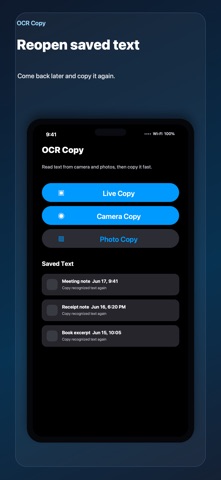
- Saved text stays on your device so you can return to it and copy it again later.
How to Use
- Install OCR Copy from the App Store.
- Open the app and complete the first screen or setup shown in the app.
- Use the main action whenever the task comes up.
- Return to the app when you want to review, adjust, or repeat the task.
Pricing
Free
Privacy
This page uses App Store metadata as its source. For the current Apple privacy labels and regional availability, check the linked App Store product page.
Screenshots


FAQ
What is OCR Copy for?
OCR Copy is a focused iPhone app from ZEC Inc. The page above summarizes its purpose, intended users, and basic usage.
Where can I download OCR Copy?
You can download OCR Copy from its official App Store page linked on this page.
How much does OCR Copy cost?
The App Store currently reports the price as Free. App Store pricing and availability may vary by country or change over time.
Where can I check privacy information?
The App Store product page contains Apple's current privacy labels and related disclosure information for this app.